> ## Documentation Index
> Fetch the complete documentation index at: https://podium.do/docs/llms.txt
> Use this file to discover all available pages before exploring further.
# Add a remote machine
> Pair another Linux host, verify its harnesses, and place issue work on it.
Add a machine when agents need repositories, credentials, or compute outside the server host. The remote daemon connects outward to the Podium server.
## Prepare the server route
Finish networking setup on the server first. The server needs a configured public URL that the new machine can reach. Use a stable URL if the machine must reconnect after either side restarts.
Cloudflare quick tunnels are suitable for demos but change URL after restart. Prefer Tailscale or a stable Transport Layer Security (TLS) reverse proxy for persistent machines.
## Generate the join command
Open **Settings**, select **Machines**, then select **Add machine**. Podium creates a single-use pairing code and a complete install command.
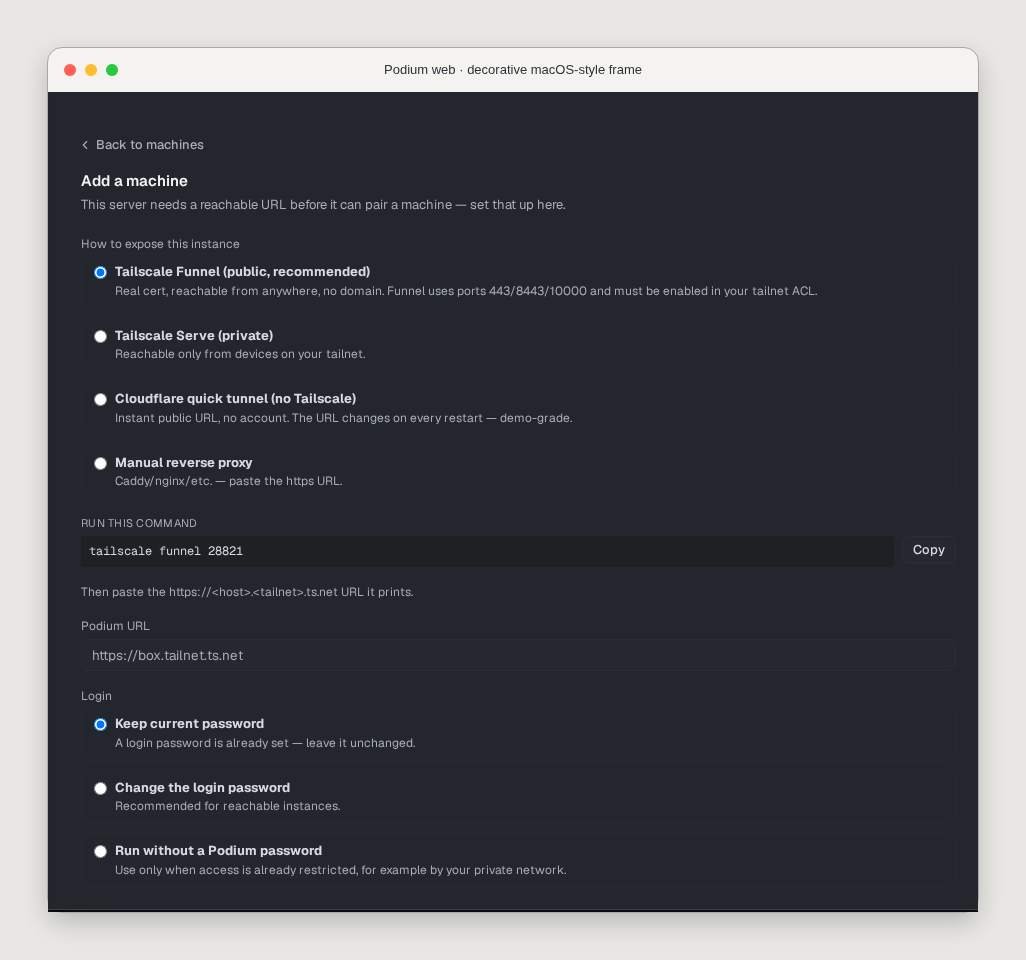 Paste that generated command on the target host. A shortened example looks like this:
```bash theme={"system"}
curl -fsSL \
https://github.com/madeinorbit/podium/releases/latest/download/install.sh \
| sh -s -- --join your_pairing_token
```
Use the command from the interface, not the illustrative placeholder. The pairing code expires after one hour.
## Verify the new machine
Inspect the daemon, repository, and harness inventory after the installer finishes:
```bash theme={"system"}
podium machine list
podium machine show your_machine_name
podium machine reprobe your_machine_name
```
The machine must show an online daemon, use permission, the target repository, and a logged-in harness.
If the repository has a cloneable origin, Podium can clone it into `~/podium-repos`. Copy local-only repositories to the machine yourself.
## Place work on the machine
Select the machine when starting the issue:
```bash theme={"system"}
podium issue start your_issue_ref \
--agent codex \
--machine your_machine_name
```
Machine placement homes the issue's branch, worktree, and agent on that host. Portable session handoff is not baseline stable behavior and support differs by harness.
Paste that generated command on the target host. A shortened example looks like this:
```bash theme={"system"}
curl -fsSL \
https://github.com/madeinorbit/podium/releases/latest/download/install.sh \
| sh -s -- --join your_pairing_token
```
Use the command from the interface, not the illustrative placeholder. The pairing code expires after one hour.
## Verify the new machine
Inspect the daemon, repository, and harness inventory after the installer finishes:
```bash theme={"system"}
podium machine list
podium machine show your_machine_name
podium machine reprobe your_machine_name
```
The machine must show an online daemon, use permission, the target repository, and a logged-in harness.
If the repository has a cloneable origin, Podium can clone it into `~/podium-repos`. Copy local-only repositories to the machine yourself.
## Place work on the machine
Select the machine when starting the issue:
```bash theme={"system"}
podium issue start your_issue_ref \
--agent codex \
--machine your_machine_name
```
Machine placement homes the issue's branch, worktree, and agent on that host. Portable session handoff is not baseline stable behavior and support differs by harness.