> ## Documentation Index
> Fetch the complete documentation index at: https://podium.do/docs/llms.txt
> Use this file to discover all available pages before exploring further.
# Install and set up Podium
> Choose a supported deployment, finish first-run setup, and verify one harness.
Install the macOS desktop app for local work, or install the headless bundle on a supported Linux host. Both paths run the same server, daemon, web interface, and agent terminals.
## Choose a supported deployment
Choose the installation that matches the host where agents will run:
| Deployment | Use it when | Support status |
| - | - | - |
| macOS desktop | Agents should run on one Mac | Supported on Apple silicon and Intel |
| Headless Linux | Agents should continue on an always-on host | Supported on x86\_64 and ARM64 |
| Linux desktop | You are evaluating the packaged x86\_64 AppImage | Preview |
| Windows desktop | You are testing development packaging | Experimental; not built in the default release pipeline |
| Hosted Podium | You have confirmed access from the Podium team | Production availability unconfirmed |
## Install the macOS desktop app
Download the latest macOS package from the [Podium releases page](https://github.com/madeinorbit/podium/releases/latest), install it, and open Podium. The packaged app starts its local services for you.
## Install on Linux
The headless installer downloads a signed, architecture-matched bundle and installs it under `~/.local/share/podium`. Run:
```bash theme={"system"}
curl -fsSL \
https://github.com/madeinorbit/podium/releases/latest/download/install.sh \
| sh
```
Open a new login shell if `podium` is not yet on `PATH`. You can also update the current shell:
```bash theme={"system"}
export PATH="$HOME/.local/bin:$PATH"
```
Set `PODIUM_NO_MODIFY_PATH=1` before running the installer if your configuration manager owns shell startup files.
## Finish first-run setup
Run Podium after installation:
```bash theme={"system"}
podium
```
An unconfigured install starts in all-in-one mode on port `18787` and prints a setup URL. Open that URL, or run `podium setup` in an interactive terminal.
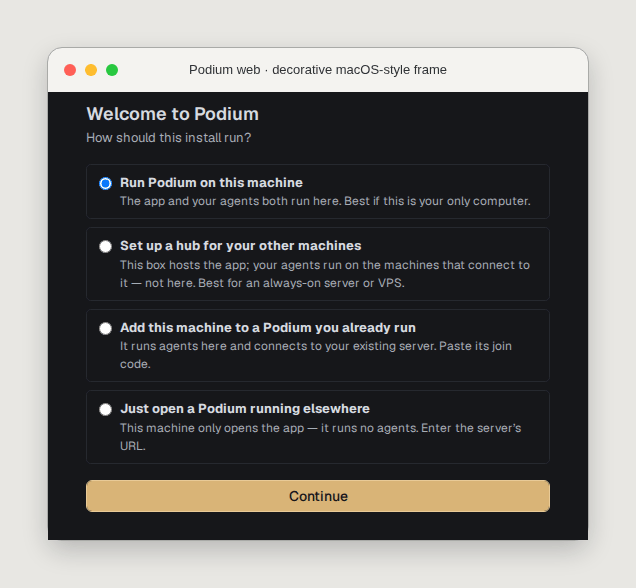 During setup:
1. Choose how clients and future machines reach the server
2. Register at least one Git repository
3. Confirm that Podium detects an installed harness and reports it logged in
4. Choose whether to opt into anonymous usage or crash telemetry
Verify the running processes and available machine:
```bash theme={"system"}
podium status
podium machine list
```
After setup, open **Settings**, then **Accounts** to check harness sign-in state. The page heading is **Accounts & Keys**.
## Choose remote access carefully
Setup supports Tailscale Funnel, Tailscale Serve, a Cloudflare quick tunnel, or your own reverse proxy. Prefer Tailscale Serve for tailnet-only access or a stable TLS reverse proxy for a durable public endpoint.
During setup:
1. Choose how clients and future machines reach the server
2. Register at least one Git repository
3. Confirm that Podium detects an installed harness and reports it logged in
4. Choose whether to opt into anonymous usage or crash telemetry
Verify the running processes and available machine:
```bash theme={"system"}
podium status
podium machine list
```
After setup, open **Settings**, then **Accounts** to check harness sign-in state. The page heading is **Accounts & Keys**.
## Choose remote access carefully
Setup supports Tailscale Funnel, Tailscale Serve, a Cloudflare quick tunnel, or your own reverse proxy. Prefer Tailscale Serve for tailnet-only access or a stable TLS reverse proxy for a durable public endpoint.
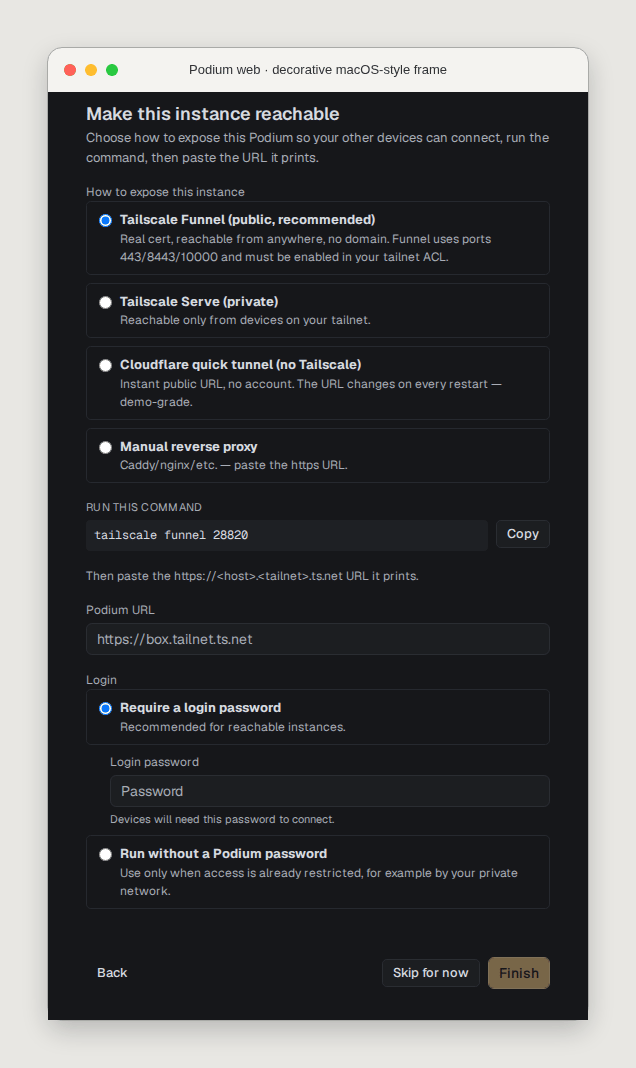 When password protection is enabled, the local sign-in form requires both **Email** and **Password**. Enter `user:sole` in the Email field and the configured Podium password in the Password field.
Cloudflare quick-tunnel URLs change on restart. Every joined machine loses contact until you run `podium set-server new_server_url` on that machine and restart its daemon with `podium stop && podium`.
A public Podium server can reach repositories, terminals, and agent credentials on paired machines. Require authentication and Transport Layer Security (TLS), or keep access inside a private network. Read [security and privacy](/docs/security/privacy) before exposing an instance.
## Next step
Continue with [your first issue](/docs/quickstart). To add compute later, follow [add a remote machine](/docs/guides/add-machine).
When password protection is enabled, the local sign-in form requires both **Email** and **Password**. Enter `user:sole` in the Email field and the configured Podium password in the Password field.
Cloudflare quick-tunnel URLs change on restart. Every joined machine loses contact until you run `podium set-server new_server_url` on that machine and restart its daemon with `podium stop && podium`.
A public Podium server can reach repositories, terminals, and agent credentials on paired machines. Require authentication and Transport Layer Security (TLS), or keep access inside a private network. Read [security and privacy](/docs/security/privacy) before exposing an instance.
## Next step
Continue with [your first issue](/docs/quickstart). To add compute later, follow [add a remote machine](/docs/guides/add-machine).